HALO by Aviso: An Architectural Deep Dive

No time to lose? Summarize with AI
ChatGPT
Claude
If you have read our overview of HALO, the first true AI Single Pane of Glass for revenue, you already know what HALO does: it sits alongside every sales call, surfaces battle cards in real time, auto-writes CRM notes, generates pre-meeting briefs, and much more.
This post goes one layer deeper. It explains how HALO actually works under the hood to bring the intelligence of a co-pilot, the precision of a data scientist, and the execution power of an automation engine into one unified interface.
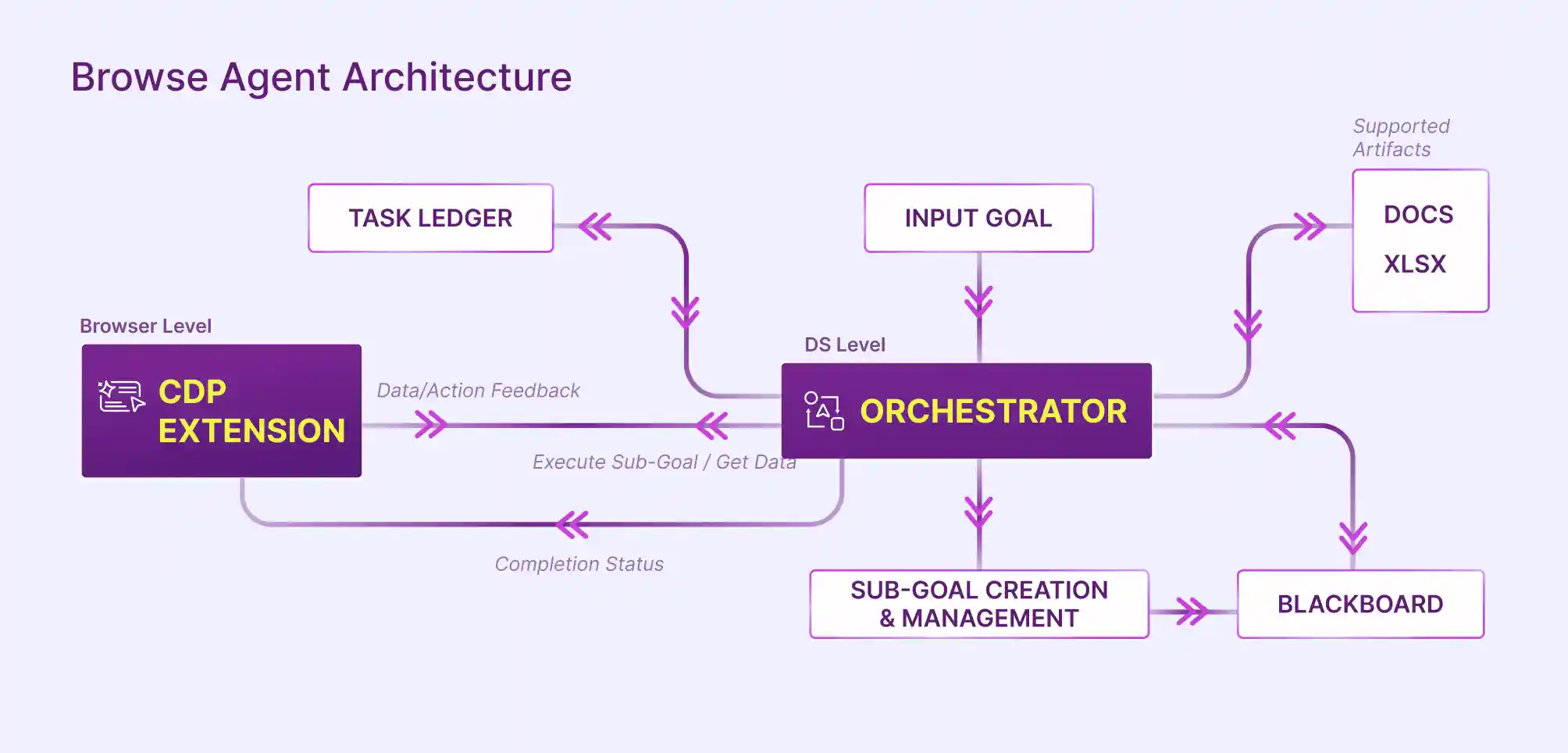
The architecture behind HALO is not a single model receiving a prompt and returning text. It is a multi-layer agentic system that coordinates browser-level execution, server-side orchestration, a shared memory store, and a progress-tracking ledger. Together, these components allow HALO to take a high-level sales goal and convert it into a sequence of precise, observable actions.
Why APIs Alone Are Not Enough
Sales workflows are inherently browser- centric. Reps toggle between a video call, a CRM tab, a LinkedIn profile, an email thread, and a content library, sometimes within a single conversation. Each of those surfaces is a siloed data source.
A purely API based agent can only reach systems that expose clean APIs. A browser agent can reach everything a human can reach in a browser, which in practice means the entire sales stack, regardless of vendor or integration status.
This difference matters more than it appears. APIs are designed for structured access to well-defined data models. They work best when the system is predictable, the schema is stable, and the required fields are already exposed. But real sales execution rarely fits this mold. Important signals often live in places that are not accessible through APIs at all, such as competitor websites, dynamic pricing pages, embedded dashboards, or even contextual cues inside user interfaces.
Even when APIs are available, they are rarely complete. They may expose core objects like accounts and opportunities, but omit the surrounding context that drives decisions. For example, a CRM API might return deal data, but not the nuance of recent conversations, changes in stakeholder engagement, or shifts in messaging across external channels.
There is also the question of interaction. Sales workflows are not just about pulling data. They involve navigating interfaces, making choices, and taking actions based on what is seen in the moment. APIs cannot replicate this behavior because they are not designed to operate within visual and interactive environments.
As a result, API first approaches tend to create a partial view of reality. They automate what is easy to access and ignore what is not. In contrast, a browser-based approach aligns with how work actually happens, enabling systems to operate across the full, messy surface area of modern sales workflows.
HALO’s Browser Agent Architecture
At a high level, HALO’s architecture is built to do something most AI systems struggle with: execute real work across messy, unstructured environments like web applications, internal tools, and dashboards.
Instead of relying only on APIs, it operates through a browser, just like a human would: reading pages, clicking buttons, filling forms, navigating flows, and extracting information, while being guided by reasoning and goals. The difference is that it does this with structured planning, memory, and continuous feedback.
To understand how it works, it helps to follow the lifecycle of a single request and see how each component contributes.
Input Goal
The Input Goal is the entry point where unstructured human intent becomes machine-operable context.
It can be expressed either as a natural language request ("Prepare my brief for tomorrow's Acme call") or a structured trigger (a competitor mention during a live call).
The system’s job at this stage is not execution, but interpretation: extracting entities, constraints, and success criteria.
For example:
“Analyze competitor pricing across five SaaS websites and generate a comparison report in Excel.”
This is intentionally high level. There are no instructions about which competitors, what pricing dimensions, what output format, and what level of completeness is acceptable. That responsibility shifts entirely to the system.
Orchestrator
The Orchestrator is the central decision engine that governs the entire agent lifecycle. Its core responsibilities are:
Parsing the goal and identifying which data sources, tools, and execution steps are required
Passing sub-goal instructions to the CDP Extension and receiving completion signals
Writing results to the Blackboard for downstream consumption
Updating the Task Ledger with progress state after each step
Triggering the artifact generation pipeline when all sub-goals are complete
The Orchestrator operates as a loop: it reads the current state from the Task Ledger and Blackboard, issues the next instruction to the CDP Extension, and waits for a completion signal before advancing. This loop continues until the full goal is satisfied or a termination condition is met.
For the example above, the Orchestrator might break it down into something like:
Identify target competitors
Open each competitor's website
Locate pricing page
Extract pricing tiers and features
Normalize data into a consistent structure
Compare across competitors
Generate an Excel report
The Orchestrator is dynamically reasoning about dependencies. For example, it knows it cannot compare pricing until data from all competitors has been collected.
It also decides which tool to use for each step. If a step involves interacting with a website, it routes it to the browser layer. If it involves structuring data, it may handle it internally.
Conceptually, it behaves like a combination of a workflow engine, reasoning model, and control system, ensuring that the agent remains aligned with the original objective while adapting to real-world variability.
Sub goal Creation and Management
Once the Orchestrator creates the high-level plan, it is broken into smaller executable units called sub-goals.
Each sub-goal is atomic, meaning it is specific and actionable. For example:
Sub goal 1: Open the website of Competitor A
Sub goal 2: Navigate to pricing page
Sub goal 3: Extract pricing table
Sub goal 4: Store extracted data
Each of these sub-goals can be executed, validated, and retried independently.
This layer also manages dependencies. For example:
Data extraction cannot happen before navigation
Report generation cannot happen before all data is collected
This ensures the system does not operate in a linear blind sequence, but in a structured and controlled workflow.
Browser Level with CDP Extension
This is where execution actually happens. It effectively acts as the agent’s “hands and eyes,” bridging abstract reasoning with concrete execution.
HALO uses a browser interface powered by a CDP (Chrome DevTools Protocol) extension, which allows deep control over the browser.
What CDP Provides:
Chrome DevTools Protocol is a low-level interface that allows external programs to observe and control browser behavior. By building on CDP, Aviso gains capabilities that a standard browser extension cannot access through the WebExtensions API alone. These include:
Full DOM inspection and mutation events without requiring page-specific scraping logic
Network intercept capabilities to observe data flowing between the browser and CRM or dialer APIs
Scripting execution in isolated contexts, allowing HALO to inject overlays without polluting the host page's JavaScript environment
Stable event hooks that survive navigation, page refreshes, and single-page application route changes
Through this layer, the system can: open URLs, click buttons, type into fields, scroll pages, read page content, and capture structured data from the DOM.
Let us continue the example.
When executing “Navigate to pricing page,” the Orchestrator sends an instruction to the browser layer. The browser then:
Loads the homepage
Scans for navigation elements
Identifies something like “Pricing”
Clicks it
Once the pricing page is open, another sub goal instructs the browser to extract pricing data.
The browser reads the DOM structure and returns structured information such as:
Plan names
Price per month
Feature lists
This is significantly more complex than simple scraping because the system must interpret page structure dynamically.
Data and Action Feedback Loop
After every action, the browser sends feedback back to the Orchestrator.
This feedback includes:
Extracted data
Page state
Confirmation of action success
Errors if something failed
For example:
If the pricing page loads successfully, the browser confirms completion
If a button is not found, it reports failure
The Orchestrator uses this feedback to decide what to do next. If something fails, it may retry, choose a different strategy, or adjust the plan.
This continuous loop is what makes the system adaptive rather than brittle.
Task Ledger
The Task Ledger is the system’s source of truth for execution progress. Think of it as a live manifest of everything the Orchestrator needs to do to complete the current goal: which sub-goals exist, which have been completed, which are in progress, which have failed, and how many retry attempts have been made.
In the example:
Competitor A pricing extracted → marked complete
Competitor B extraction failed → marked failed and retried
Competitor C pending → queued
This prevents duplication of work and ensures that progress is always visible and auditable.
It also allows the system to resume tasks if interrupted.
The Task Ledger serves three functions in the system:
Durability: If the CDP Extension returns a failure signal, the Orchestrator consults the Task Ledger to determine whether to retry, skip, or abort the step
Observability: The Task Ledger provides a structured audit trail of what HALO did to complete a goal, which is useful for debugging, compliance logging, and future model improvement
Sequencing: The Task Ledger enforces that sub-goals execute in the correct order, respecting any dependencies between steps
Blackboard
The Blackboard is a shared working memory where intermediate sub-goal responses are stored. In HALO's architecture, it solves a specific problem: the output of one sub-goal (for example, the retrieved DISC profile of a buyer) needs to be available to a later sub-goal (the generation of the pre-meeting brief) without the Orchestrator holding that state in memory or passing it as a parameter through every intermediate step.
Think of it as a structured scratchpad that all components can read from and write to.
In the pricing example, the Blackboard might look like: Competitor A's pricing data, Competitor B's pricing data, Competitor C's pricing data.
As each sub-goal completes, new data is added to the Blackboard.
Later steps, such as comparison and report generation, pull from this shared memory instead of recomputing everything.
This design is critical because by writing to and reading from the Blackboard, HALO's sub-goals can be implemented as loosely coupled, independently testable units. This also makes the system easier to extend: adding a new sub-goal type means writing a new executor that reads from and writes to the Blackboard, without modifying the Orchestrator's core loop.
Supported Artifacts
Once all sub-goals are completed, the system generates outputs in usable formats such as docs and xslx (artifacts).
These artifacts can include:
Documents: docs
Post-call summaries, pre-meeting briefs, draft follow-up emails, and next steps extractions are all rendered as structured documents that can be copied directly into a CRM, shared in Slack, or attached to a calendar invite.
Spreadsheets: xlsx
For data-heavy outputs such as deal health scorecards, pipeline summaries, or coaching reports, HALO generates xlsx artifacts that can be opened directly in Excel or uploaded to Google Sheets. This format is particularly useful for managers reviewing multiple deals at once or analyzing call coaching scores across a team.
Completion Status and Final Loop
As each task completes, the system updates the Task Ledger and evaluates whether the overall goal has been achieved.
If all sub-goals are complete and no dependencies remain, the system marks the entire workflow as complete.
If not, it continues the loop:
Observe → Plan → Execute → Feedback → Update
This loop continues until the goal is fully satisfied.
From Automation to Decision-Driven Execution
API-first agents will continue to power speed and scale where integrations are clean. But real-world GTM work rarely lives in one system. It spans CRMs, emails, dashboards, competitor sites, and internal tools. This is where a browser-native approach closes the last-mile gap, turning fragmented processes into a single, goal-driven loop.
The takeaway is simple: the future isn’t UI vs API. It’s intelligent orchestration across both, grounded in your business context and executed with precision.
Aviso HALO is built for exactly this reality. It brings together planning, execution, and memory to help revenue teams move from insight to action, without stitching together brittle workflows or waiting on integrations.
If you want to see how agentic planning can transform your GTM execution, explore HALO by Aviso or book a demo.
Read More Like This