Aviso Spring 2026 Product Updates
Activity & People Intelligence
Agentic AI
AI for Sales
Conversation Intelligence
Deal Intelligence
Product Updates
No time to lose? Summarize with AI
ChatGPT
Claude
Aviso's spring 2026 release ships updates across every layer of the revenue stack. Key highlights include:
Pipeline health scoring with Pentagon Score and Historical Execution Benchmarking
MIKI evolving into a multi-agent intelligence system with Context Graph
Context-aware call summaries across AE, CSM, SDR, and internal calls
Halo, Aviso's conversation intelligence platform, now expanded with a dedicated AI layer for customer success teams
Here is what your team gets access to starting this quarter.
AGENTIC PLATFORM
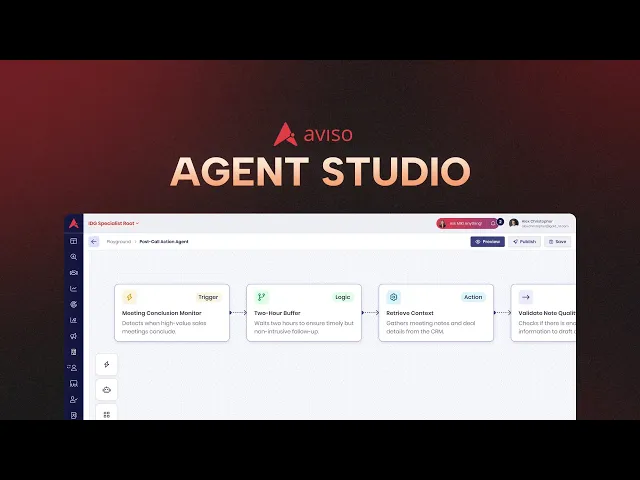
1. Agent Studio: Revenue workflow agents are now built in plain language and deployed without engineering
Building custom revenue workflows used to require engineering resources and weeks of implementation. Agent Studio removes both constraints.
What is it and how does it help:
Natural language descriptions automatically generate triggers, logic steps, CRM connections, and permissions
When an integrated tool changes its API, the agent switches to an alternative connection automatically
Each completed deal feeds the outcome back, so agent recommendations improve over time
Revenue operations teams build, test, and adjust agents without writing a single line of code
Most teams have their first agent live within a week.
Where to find it: Log into app.aviso.com > Agent Studio
2. Role-Specific Agentic Workflows: Daily deal worklists are now pre-built for AEs, SDRs, managers, RevOps, and CS
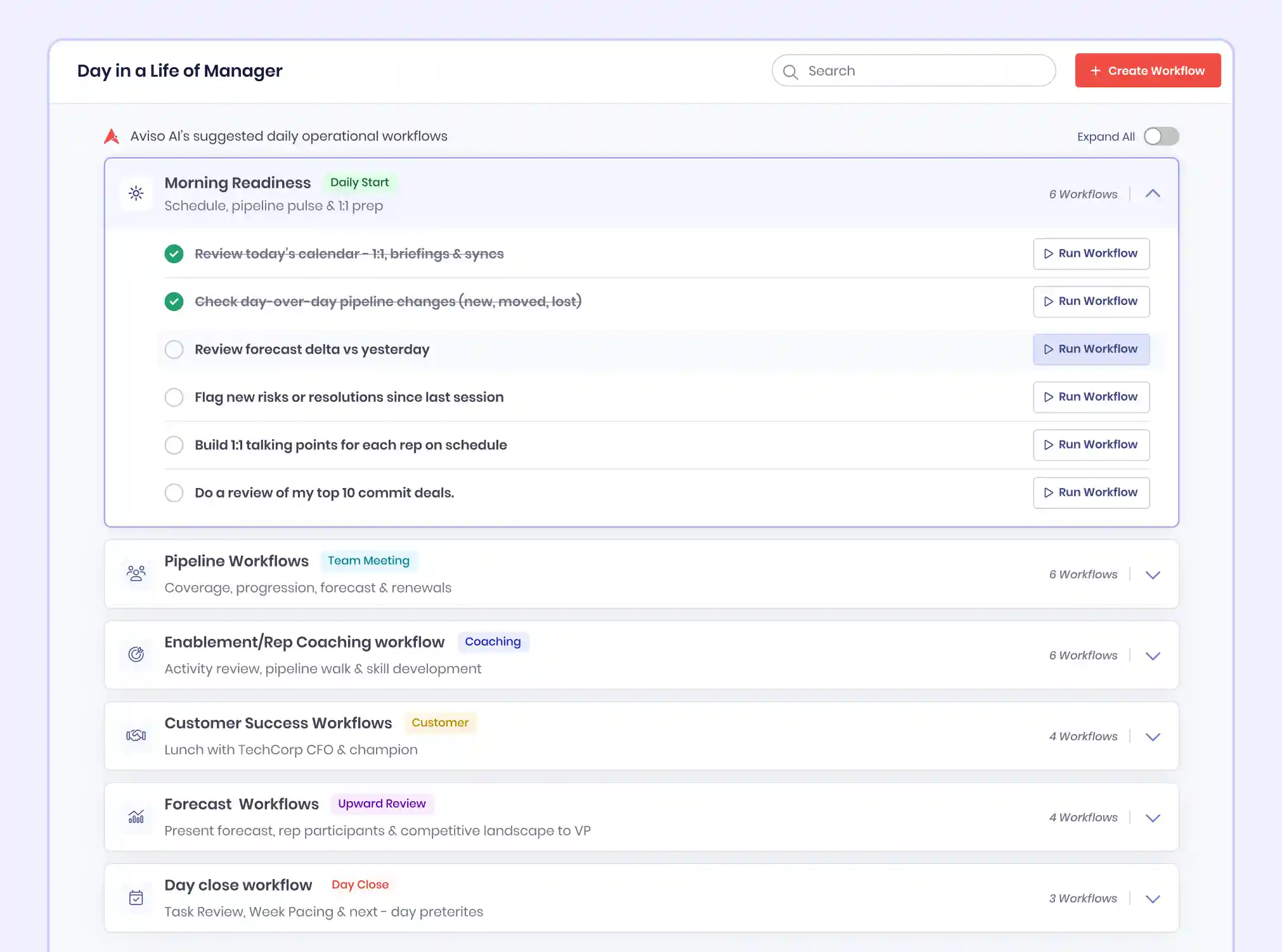
Every role on a revenue team has different execution priorities, but most platforms were surfacing the same view for everyone. Role-specific workflows have changed that.
What is it and how does it help:
An AE's worklist shows deals with no activity in seven days and recommended next actions
A manager's workflow surfaces deals that have changed the forecast category since yesterday for review
A revenue leader's workflow shows AI-predicted close versus rep-submitted commit before the forecast call
Any validated workflow is shared to the team library and deployed org-wide in one click
Where to find it: Log into app.aviso.com > Agent Studio > Role-Specific Workflows
AGENT LIBRARY
3. New Agents Added to the Library: Eight new agents across RFP, QBR, renewal, health, ICP, buying committee, and CPQ
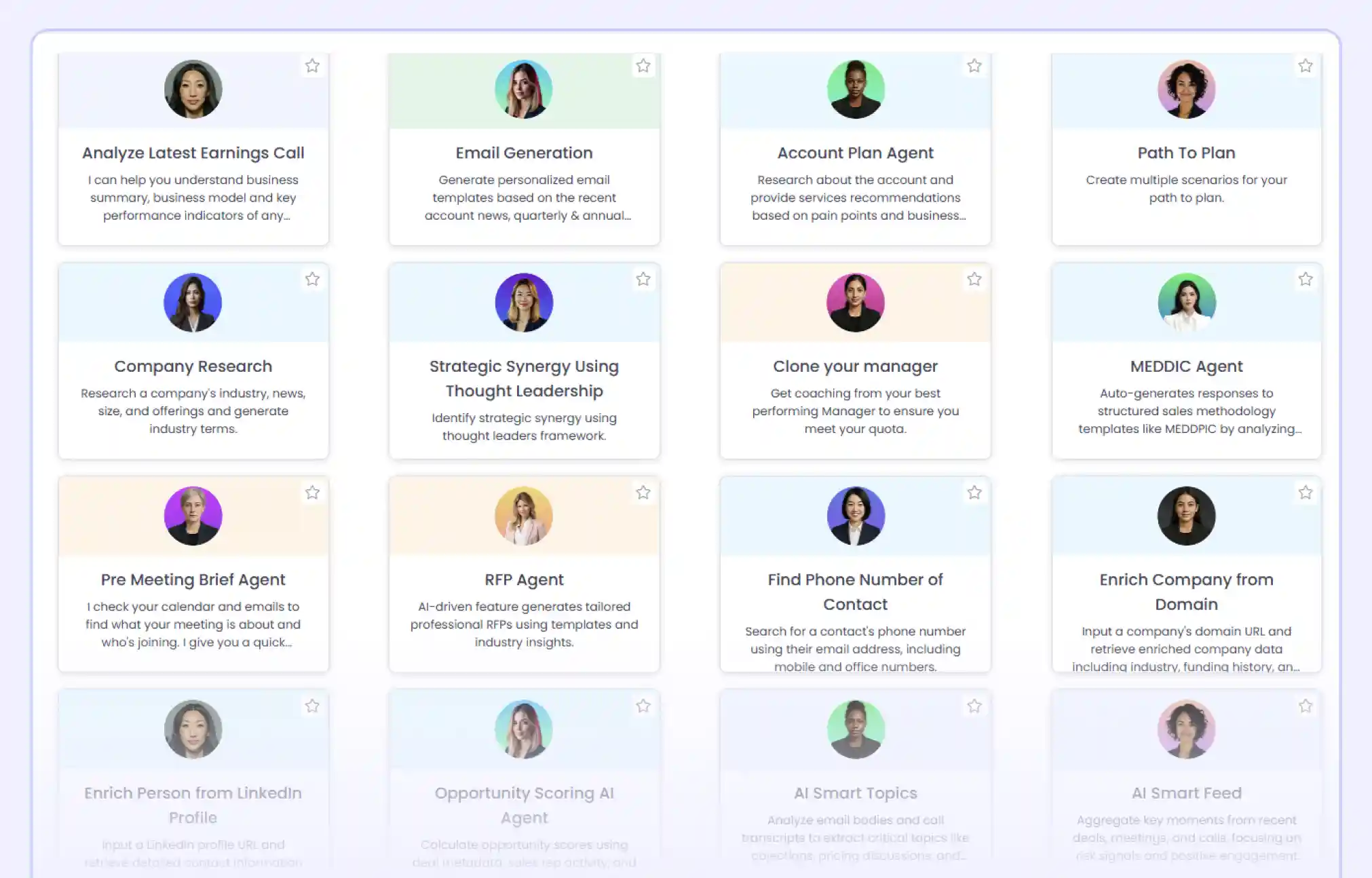
Every agent is scoped to a revenue execution point where manual effort creates deal risk. Eight new agents were added this quarter.
What is it and how does it help:
RFP Response: Draft answers from your knowledge base with a confidence score per question
QBR Builder: Generate performance, risk, roadmap, and expansion sections from account data automatically
Renewal Intelligence: Flag accounts at churn risk before the renewal conversation has started
Account Health Monitoring: Rank accounts by urgency across adoption, support, and engagement signals
ICP Fit Scoring: Rank pipeline accounts by firmographic fit, intent data, and behavioral signals
Buying Committee Mapping: Identify decision-makers, champions, and blockers from calls and emails
Leading Indicator Agent: Flag deals trending toward a slip before they appear as forecast problems
CPQ and Quote Generation: Generate accurate, formatted quotes from a conversational prompt instantly
Every agent runs on live CRM, call, and email data, so outputs reflect your actual pipeline.
Where to find it: Log into app.aviso.com > Agent Library
MIKI, AGENTIC CHIEF OF STAFF
4. Context Graph: CRM, call transcripts, emails, and competitive playbooks synthesized into one reasoning layer

Revenue questions rarely had answers sitting in a single system. The Context Graph connects every data source your revenue team works across into one reasoning layer.
What is it and how does it help:
CRM records and call transcripts are connected, so MIKI answers questions across both simultaneously
Answers reflect what buyers actually said on calls, not just what reps logged in CRM fields
Every answer cites the specific call, email, or CRM record that supports each conclusion
When you ask MIKI which deals are at risk from a competitor, you get a recommended action, not a list of mentions.
Where to find it: Log into app.aviso.com > MIKI > Ask anything about your deals, pipeline, or accounts
5. AI CRM Updates: CRM fields updated instantly via MIKI with a single command
Reps were losing time updating the CRM field by field after every call. MIKI now handles CRM updates directly, either through a direct command or AI-guided suggestions based on live deal data.
What is it and how does it help:
Tell MIKI what to update, and she handles multiple fields in one go
Ask Anything surfaces AI-powered suggestions on what needs updating, so you choose what to apply
Every update syncs to your CRM instantly, with a preview before you commit
Where to find it: Log into app.aviso.com > MIKI > Ask Anything > CRM Update
6. MIKI Deep Intelligence: Competitive deal intelligence surfaced across your entire pipeline instantly
Sales leaders were piecing together competitive intelligence from CRM, call recordings, and emails while deals slipped. MIKI connects all of it and delivers data-driven conclusions with the depth to act on, not just a list of mentions.
What is it and how does it help:
Ask which deals a competitor is involved in and get win probability, unaddressed risks, and the exact plays that closed similar deals, all in one answer
MIKI combines structured CRM data with unstructured call transcripts and emails so answers reflect what buyers actually said, not just what reps logged
Draw insights across your entire team hierarchy, spotting recurring bottlenecks, slipped deals, and pipeline patterns that no single rep or manager can see alone
Where to find it: Log into app.aviso.com > MIKI > Ask Anything
REVENUE FORECASTING
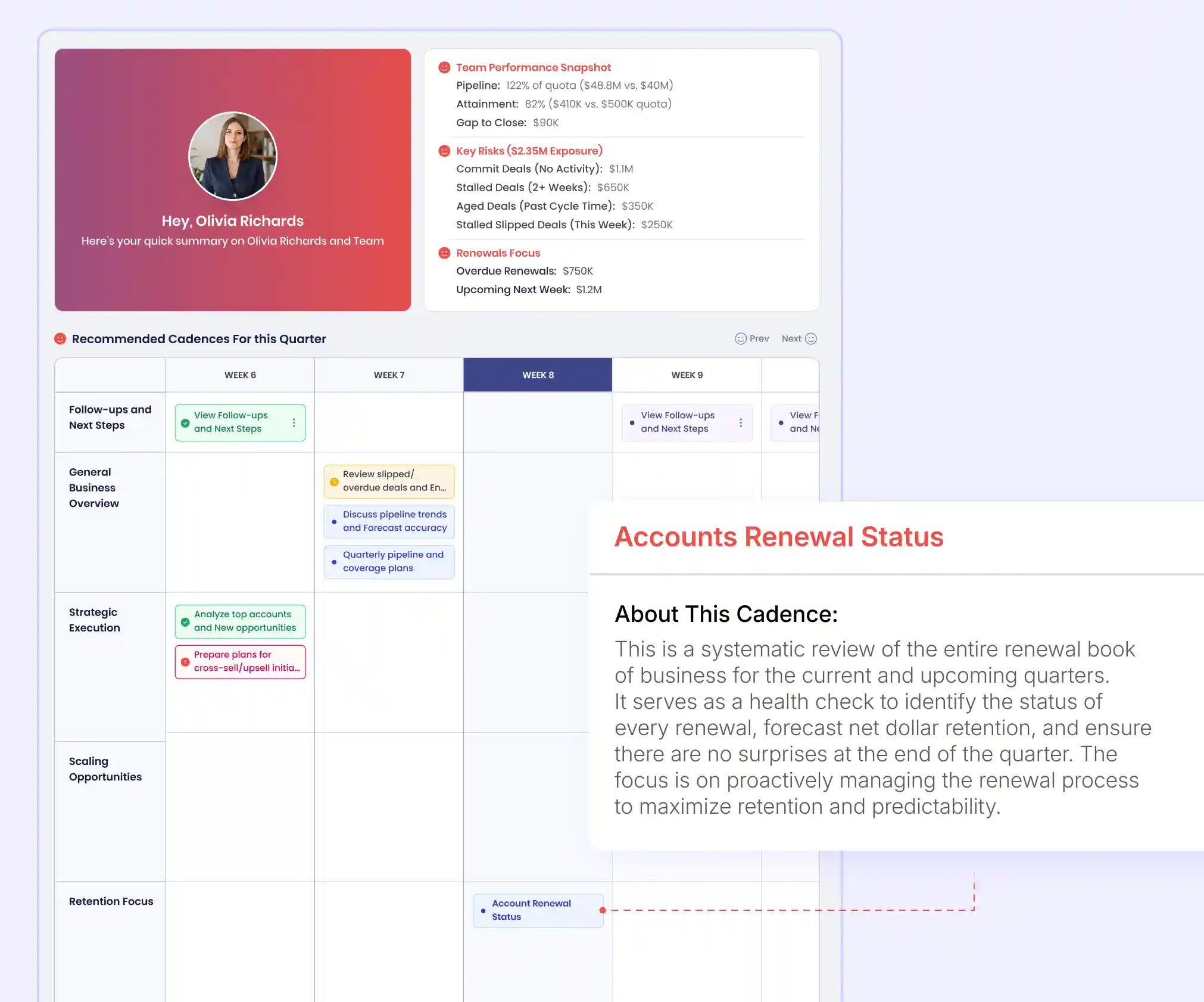
7. AI Cadences: MIKI assigns a specific revenue focus to each of the 13 weeks automatically
Revenue leaders no longer need to determine what to focus on each week. MIKI now structures and drives that decision based on live pipeline data.
What is it and how does it help:
Each week is assigned one of five focus areas, so no week lacks a defined operational priority
MIKI surfaces quota attainment, gap to close, and commit deal risk every week automatically
Slipped deals, stalled deals, and below-coverage reps are flagged at the week needing action
Every week, your team knows exactly what to focus on and why.
Where to find it: Log into app.aviso.com > MIKI > Cadences
8. Pentagon Score: Pipeline health is now scored across Coverage, Qualification, Maturity, Spread, and Quality
Pipeline reviews often end in disagreements about whether the number is real. The Pentagon Score gives every pipeline conversation a shared, objective foundation.
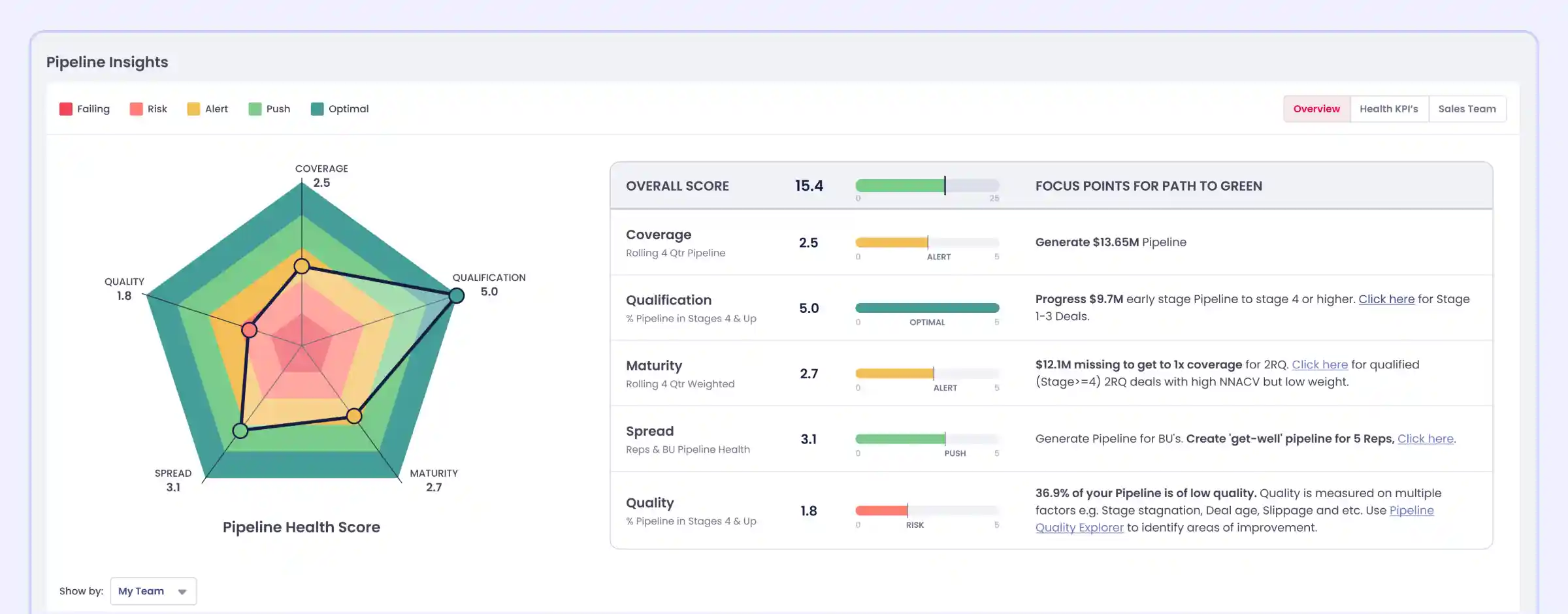
What is it and how does it help:
Each dimension gets a color status: red for critical risk, amber for needs attention, green for on track
The lowest-scoring dimension shows which pipeline problem is putting next quarter at risk
Clicking any dimension opens the specific deals, dragging that score down
Every team scores on the same criteria, so cross-regional comparison stays objective
Where to find it: Log into app.aviso.com > Dashboard > Pipeline Insights > Overview
9. Historical Execution Benchmarking: Coverage Ratio deviation from prior fiscal year patterns visible from Week 4
The same pipeline number means different outcomes depending on where you are in the quarter. Historical Execution Benchmarking replaces gut feel with trajectory-based evidence.
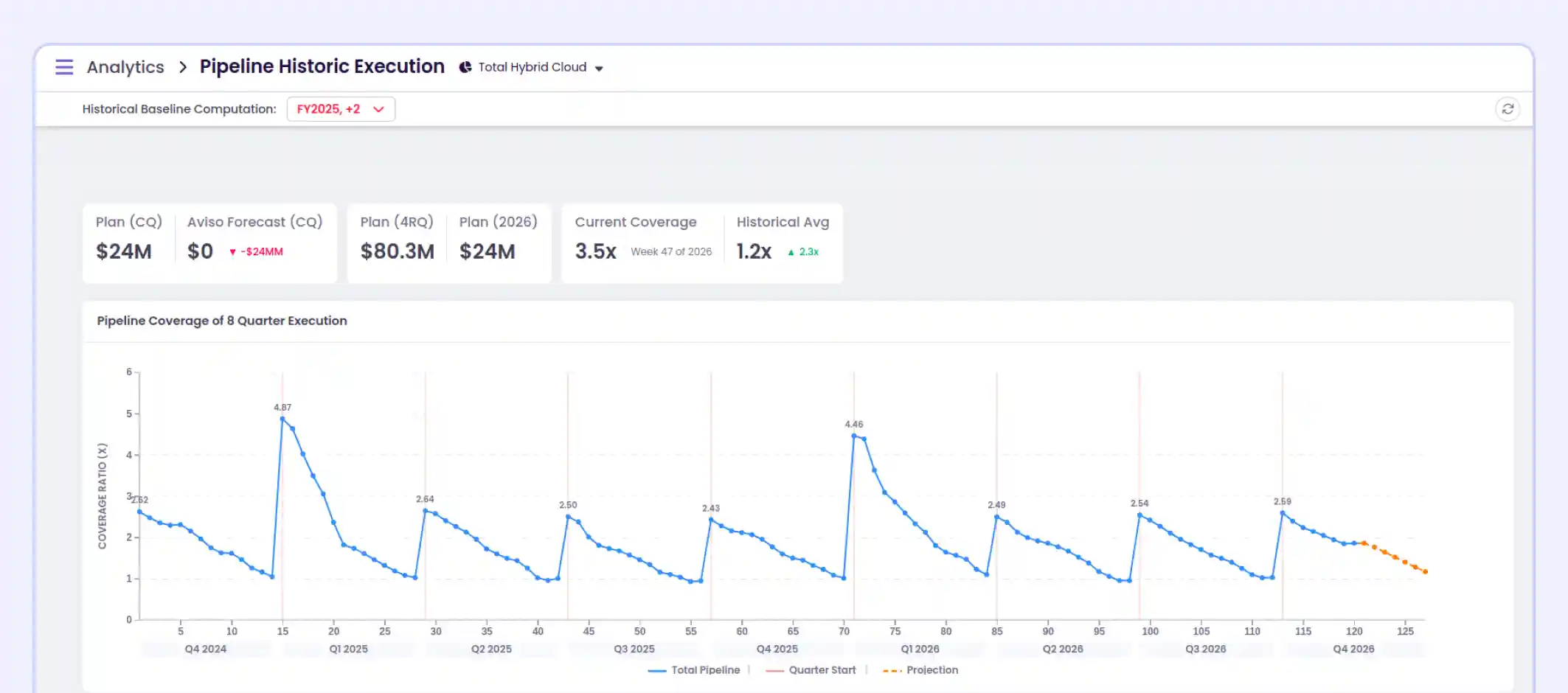
What is it and how does it help:
The 8-Quarter Heartbeat View shows whether pipeline creation is structurally weakening across quarters
Individual prior fiscal year lines show exactly which past years' current execution is trailing
The 4-Rolling-Quarters view shows whether the pipeline today supports the quota across the next four quarters
A Week 4 deviation gives revenue teams eight or more weeks to rebuild the pipeline
Where to find it: Log into app.aviso.com > Analytics > Hamburger icon > Pipeline Historical Execution
CONVERSATION INTELLIGENCE
10. Deals Board: WinScore, Engagement Grade, Smart Trackers, MEDDPICC, Buyer Interest Score, and Pitch Adherence on one board
Managers were assembling deal intelligence from CRM records, call summaries, and engagement data separately before every pipeline review. The Deals Board consolidates every deal execution signal into one operational view.
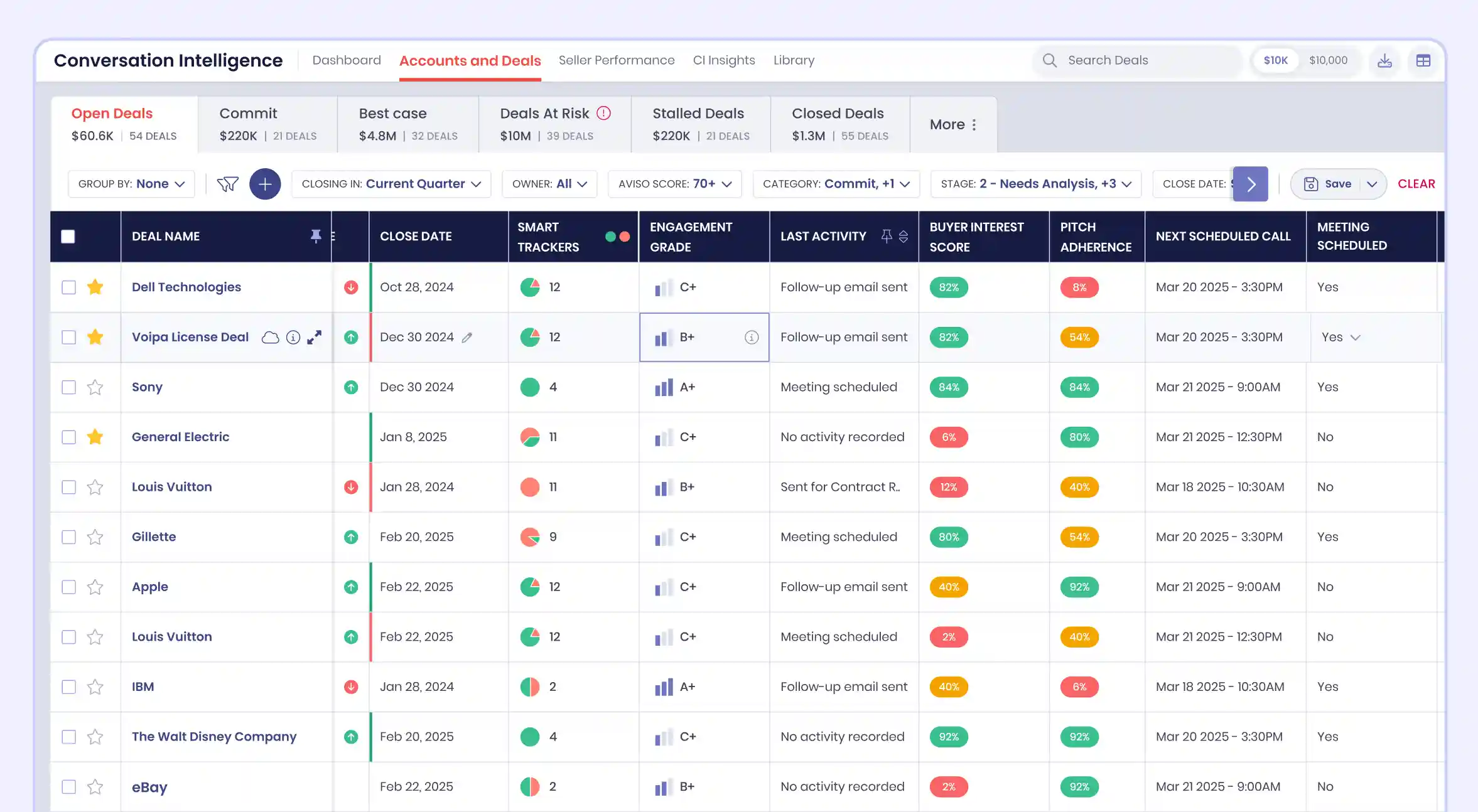
What is it and how does it help:
WinScore shows each deal's AI-generated close probability against the minimum threshold for that deal
Smart Trackers show running counts of positive and negative buyer signals from every sales call
Buyer Interest Score plots a two-month prospect sentiment trend across Negative, Confused, Inactive, and Positive call outcomes
Pitch Adherence tracks rep coverage of Introduction, Product, Pricing, and Technology discussion categories per call
MEDDPICC fields are auto-populated from call transcripts so qualification gaps surface without rep self-reporting
One board gives managers everything needed to run a pipeline review without opening another tool.
Where to find it: Log into app.aviso.com > Conversation Intelligence > Accounts and Deals
11. Context-Aware Smart Summaries: Summary structure, sections, and participant roles shift automatically by call type and deal stage
A single summary template was producing irrelevant output for three out of four call types on every team. Aviso now classifies every call at two levels and routes it to a purpose-built output engine.
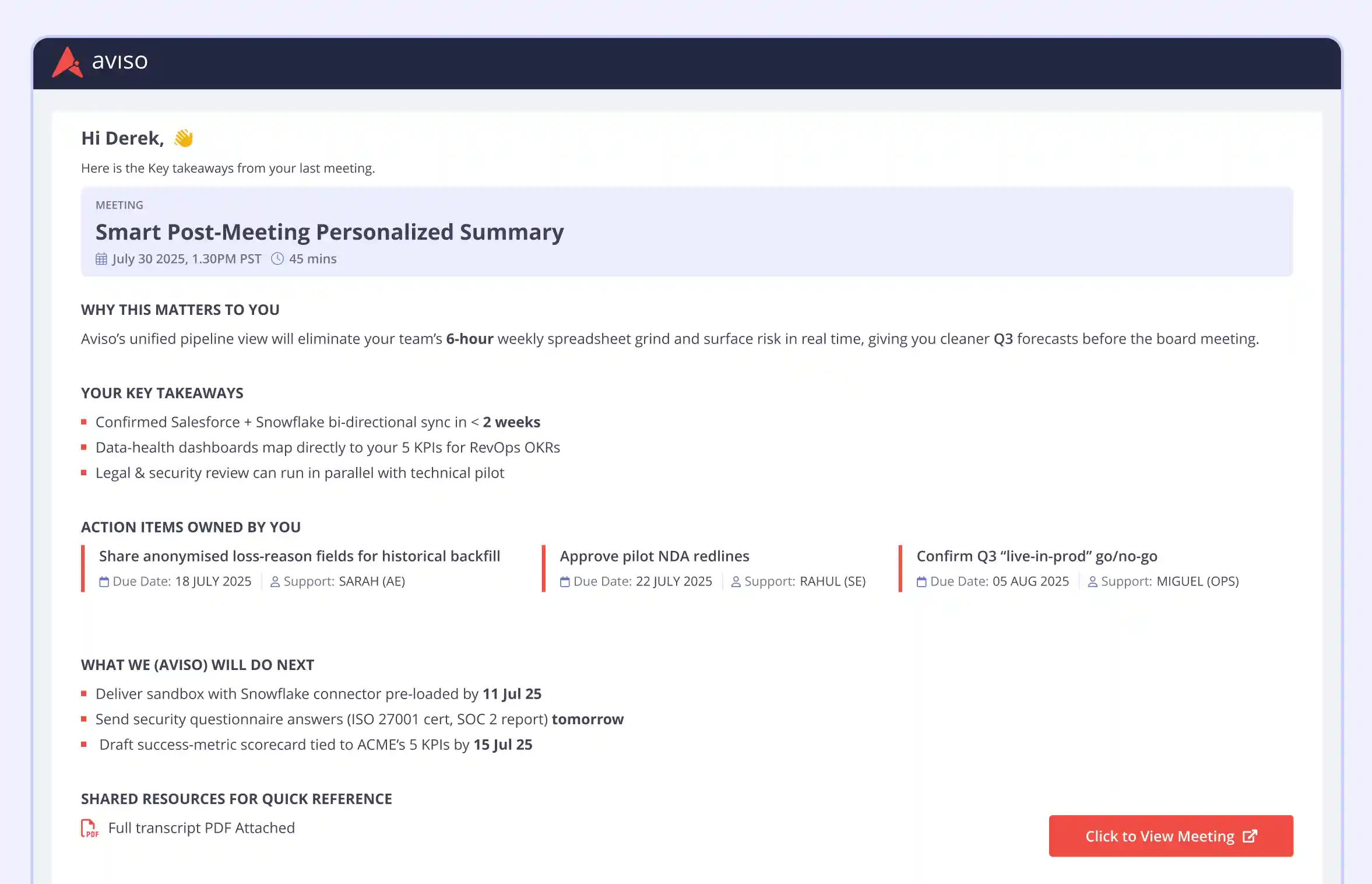
What is it and how does it help:
Discovery call summaries focus on pain signals and qualification gaps while negotiation summaries focus on commercial terms, objections, and next steps to close
CSM calls are classified into QBR, health check, renewal, or escalation, and each produces a different output reflecting that specific post-sale conversation
SDR summaries lead with Meeting Booked: yes or no, then score pitch quality and objection handling
Internal calls surface blockers with named owners, decisions with reasoning, and action items with assignees and deadlines
Where to find it: Log into app.aviso.com > Conversation Intelligence > Call Summary > select any call
12. Sales Coach Avatar: AI-led rep certification and deal-specific pre-call practice simulations now available on demand
New sales hires were ramping through inconsistent coaching that depended entirely on manager bandwidth. The Sales Coach Avatar, Norman, delivers structured onboarding and deal-specific practice at scale.

What is it and how does it help:
Managers build certification programs with required modules tagged by skill area and a minimum pass score
Norman pulls the rep's actual CRM deal, including prospect role, deal stage, and buyer DISC profile for simulation
A real-time coaching overlay flags missed objections and skipped discovery questions during the simulation
After each session, the rep receives scores on pitch accuracy, objection handling, discovery depth, and closing strength
Managers see every rep's certification status, module scores, and skill gaps in one dashboard
Early Aviso deployments show up to 60% reductions in ramp time, 26% increases in first-call success rates, and up to 40% improvements in win rates.
Where to find it: Log into app.aviso.com > Conversation Intelligence > Sales Coach Avatar
ACTIVITY AND RELATIONSHIP INTELLIGENCE
13. Advanced Activity Mapping: Activity attribution accuracy improved, so pipeline and rep performance data are clean
Misattributed activity data was distorting pipeline visibility and skewing rep performance metrics. Advanced Activity Mapping now eliminates that distortion at the source.
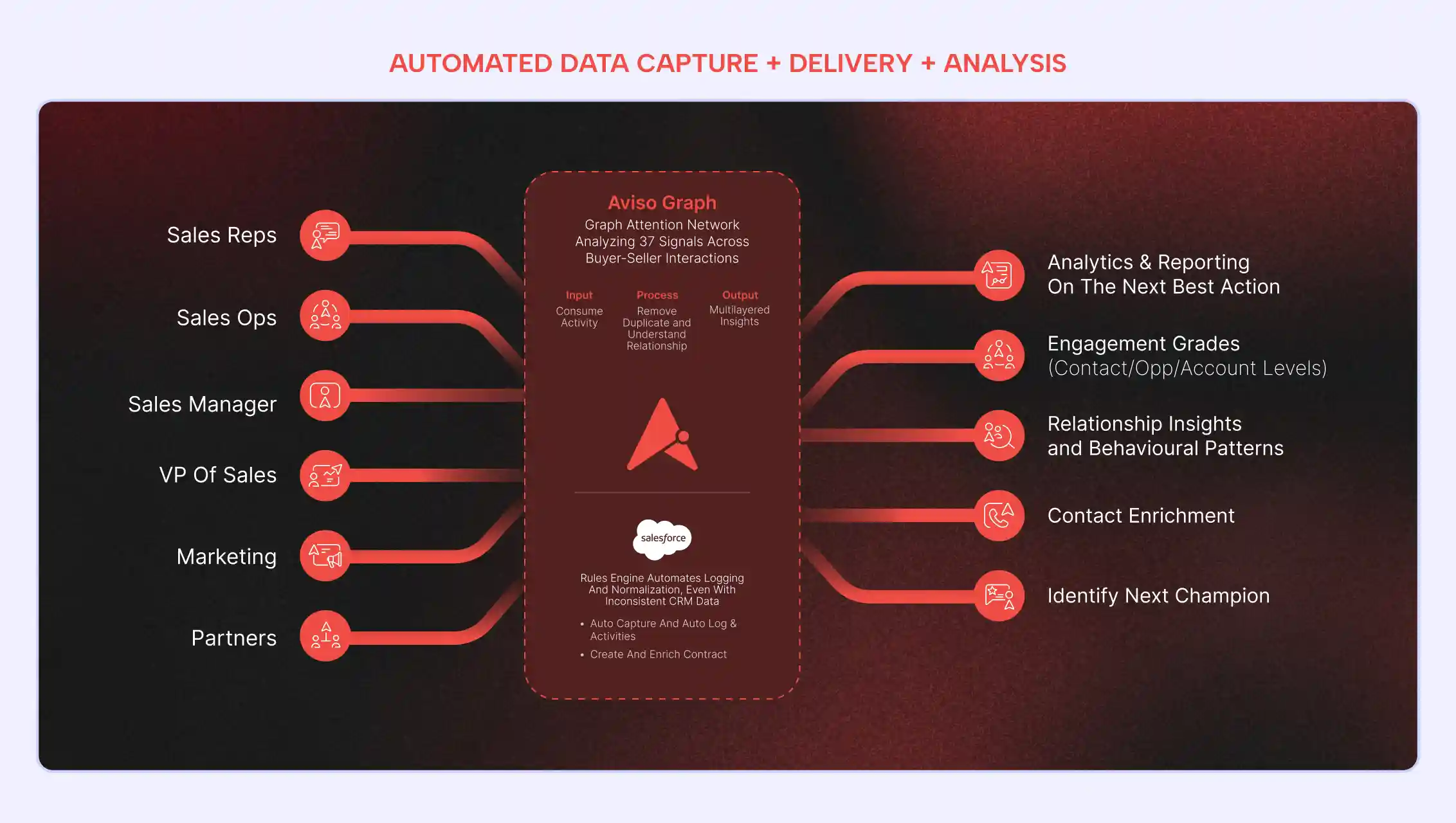
What is it and how does it help:
Deals appearing active due to misattributed calls now show their true stalled status to managers
Rep performance metrics reflect only the activity that the specific rep actually drove on each deal
Forecast inputs are built from verified deal activity, so pipeline risk signals are not inflated
Where to find it: Log into app.aviso.com > Deals > Activity Timeline
14. Mapping Accuracy Report: Full activity attribution visibility available on demand
Activity mapping is only trustworthy if you can see how every interaction was processed. The Mapping Accuracy Report gives sales ops a complete, downloadable breakdown of how interactions were captured, cleaned, and mapped across your CRM.
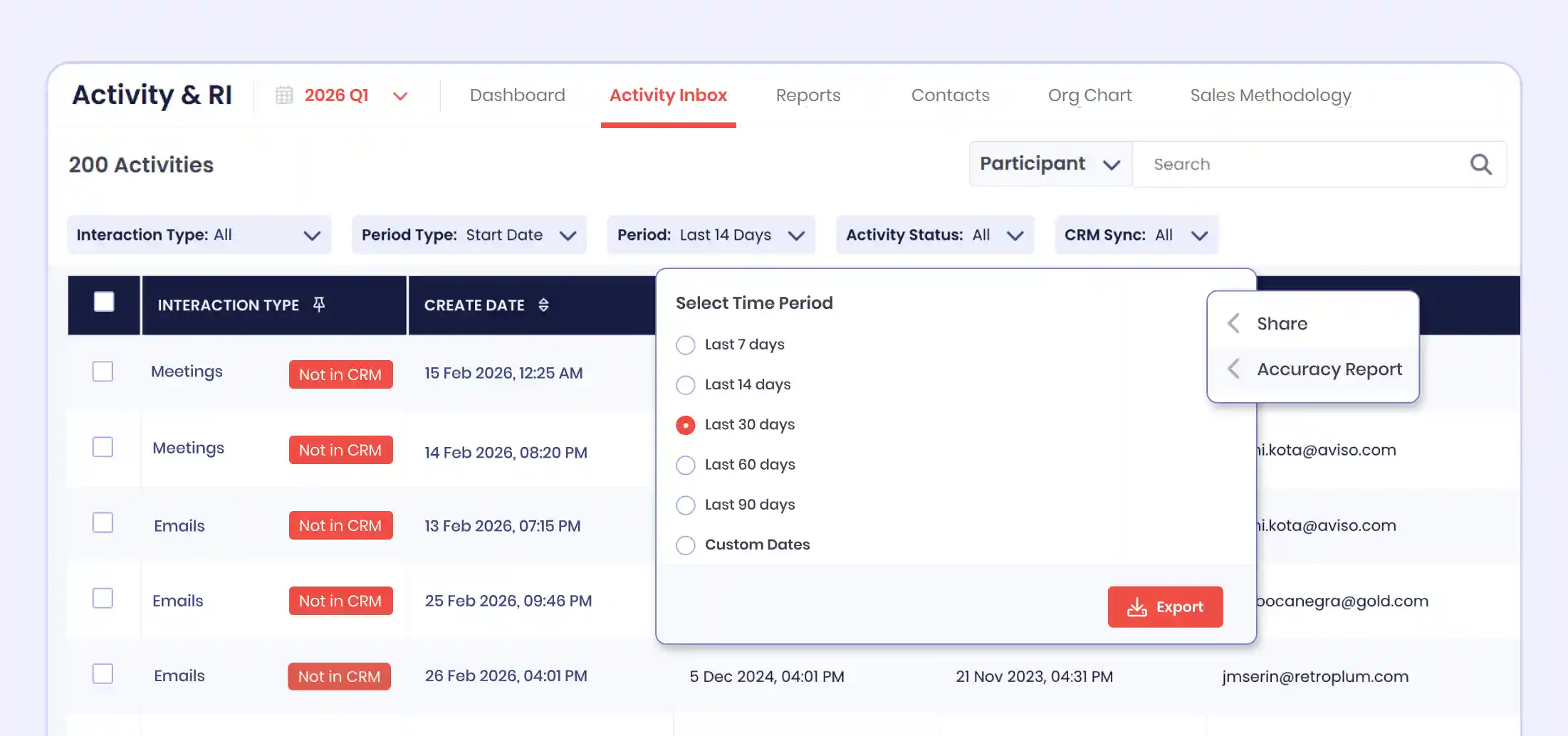
What is it and how does it help:
Each stage of the pipeline shows where CRM data gaps are affecting results and what to fix
A drop between account-level and opportunity-level accuracy points directly to sparse contact roles or missing opportunity team members
The report is available self-serve for any time period, not surfaced once a quarter in a review deck
Where to find it: Log into app.aviso.com > Activity and RI > Activity Inbox > Three-dot menu > Accuracy Report
15. Engagement Health Grade: Buyer engagement is now graded on seniority, reciprocity, and recency, benchmarked against similar deals
High outbound email volume was being mistaken for strong two-way stakeholder engagement. The Engagement Health Grade gives revenue teams an accurate read on where each deal relationship actually stands.
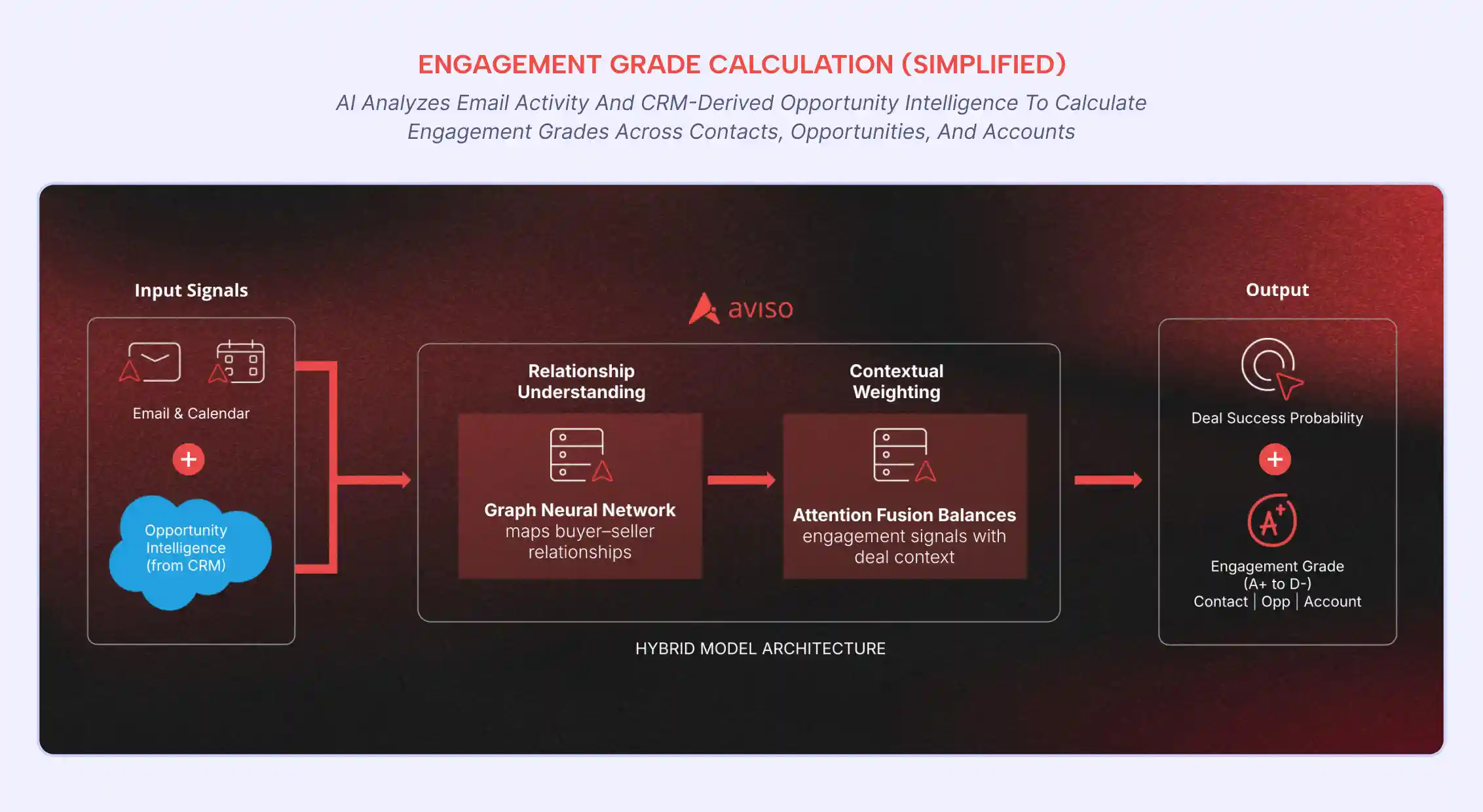
What is it and how does it help:
No executive contact for three-plus weeks triggers a flag with historical loss rate for that pattern
Deals where only the rep is emailing are identified separately from genuinely two-way engaged deals
The 30-day grade trend shows whether buyer responsiveness is increasing or dropping per deal
Each grade is compared against closed-won and closed-lost deals at the same stage for context
When a deal looks active, but the grade is declining, there is still time to act.
Where to find it: Log into app.aviso.com > Deals > Select any deal > Engagement Grade panel
LEAD INTELLIGENCE
16. Website Visitor Intelligence: Target account identity and page-level purchase intent captured before form submission
Target accounts were researching your product without your team knowing. Website Visitor Intelligence gives sales teams account-level intent data before any inbound signal is generated.
What is it and how does it help:
Sessions, pricing pages visited, and time spent classify each visiting account as hot, warm, or cold
Each visitor record shows Lead Score, company size, deal stage, and account owner for context
The AI SDR Avatar engages high-intent visitors while they are still on the site
The CRM account owner is matched automatically so inbound reaches the right rep instantly
Where to find it: Log into app.aviso.com > Lead Intelligence > Website Visitors
17. Intelligent Lead Routing: Lead assignment now driven by rep win history, deal type fit, and live calendar availability
Leads were being assigned based on territory rather than win history or deal fit. Routing now happens based on data, not org charts.
What is it and how does it help:
Each lead is matched to the rep with the strongest win rate for that industry and deal type
The rep receives objections raised, pages visited, and recommended next action at handoff
Routing fires at the moment of qualification so no sales-ready lead sits unassigned
Where to find it: Log into app.aviso.com > Lead Intelligence > Lead Routing
SALES ENGAGEMENT
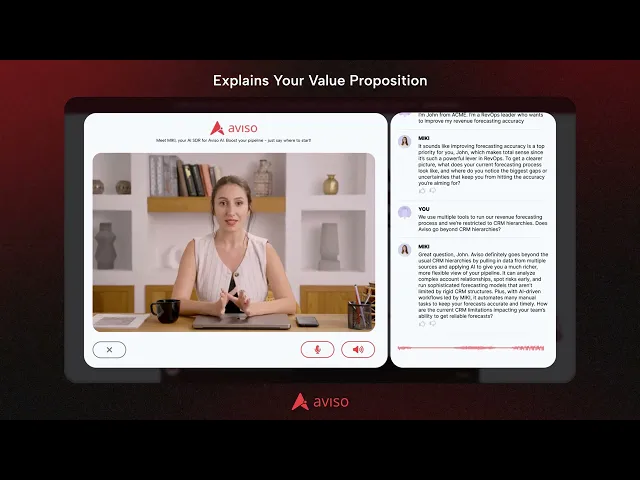
18. AI SDR Avatar: Inbound visitors qualified via BANT or MEDDIC and booked into rep calendars automatically
Inbound leads were going cold between form submission and first rep contact. The AI SDR Avatar closes that gap immediately.
What is it and how does it help:
Only visitors meeting configured qualification criteria, such as role and company size, reach reps
The rep receives every objection raised, pages visited, and recommended next action via MIKI
The Avatar operates around the clock, so after-hours leads receive an immediate qualified response
Prospects who do not book are placed into a nurture sequence tailored to their raised objections
Where to find it: Log into app.aviso.com > Sales Engagement > AI SDR Avatar
CUSTOMER SUCCESS INTELLIGENCE
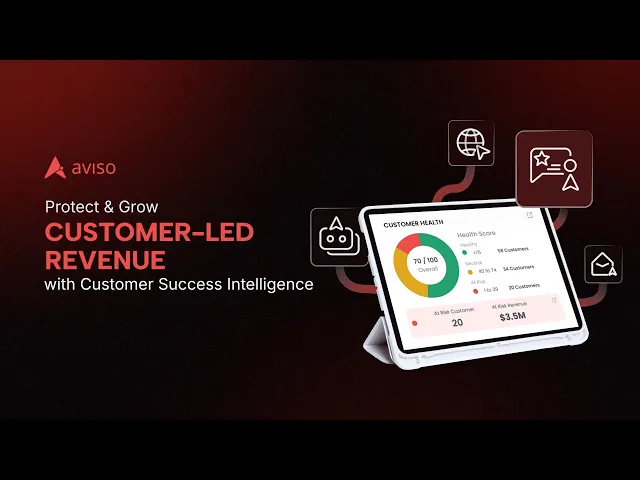
19. Halo: Aviso's CI platform expanded with a post-sale AI execution layer for CSM teams
CSMs were managing renewals, health checks, QBRs, and escalations using tools built for new business sales motions. Halo extends Aviso's platform with a post-sale revenue layer built specifically for CS execution.
What is it and how does it help:
Each morning, Halo ranks accounts by urgency using renewal proximity, health score drops, and engagement gaps
Pre-meeting briefs load interaction history, unresolved QBR commitments, and AI conversation starters automatically
During calls, Halo tracks sentiment, agenda topic coverage, and flags competitor mentions in real time
Post-call CRM updates, call summaries, and stakeholder notifications are written and sent automatically
Every QBR commitment is tracked against a resolution deadline, so nothing falls through between review cycles
Where to find it: Log into app.aviso.com > Customer Success Intelligence > Halo
20. Renewal and Churn Risk Monitoring: Adoption and engagement deterioration signals are now monitored continuously across every account
Churn conversations were starting after deterioration signals had already been missed. Aviso now monitors every account continuously, so CS teams act on risk before customers raise it.
What is it and how does it help:
Health score drops identify whether the cause is reduced logins, lower feature adoption, or increased support tickets
Churn risk alerts reach the CSM before the customer has decided to initiate a cancellation request
Expansion readiness signals flag accounts showing increased feature usage or capability questions on recent calls
QBR decks are auto-generated with performance, open risks, roadmap alignment, and renewal context pre-populated
Where to find it: Log into app.aviso.com > Customer Success Intelligence > Account Health
We remain committed to shipping product developments that help revenue teams perform at their best, every quarter.
Ready to see these updates in action? Book a walkthrough with the Aviso team.
Read More Like This