AI Agent Architecture For GTM: How A DAG-Based Agentic Builder Works

No time to lose? Summarize with AI
ChatGPT
Claude
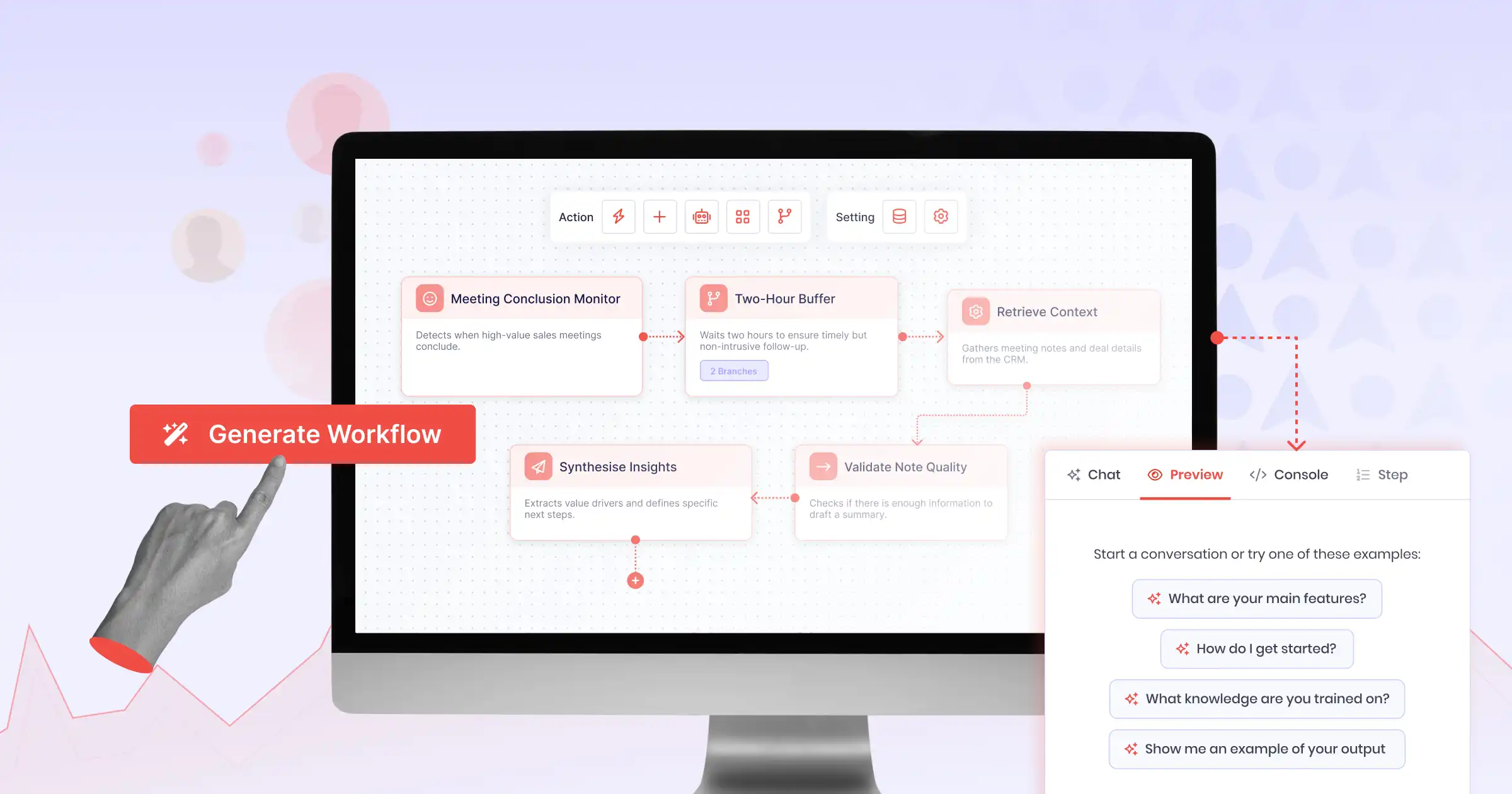
Part 1 of the Aviso Agent Studio Series established why first-gen automation breaks on complex GTM workflows and where existing tools fall short. In Part 2, we examine the architectural solution: what a DAG-based agentic builder is, how its planning and execution loop operates, and why each component is critical to enabling adaptive, enterprise-grade automation. |
The term “agentic” is used so broadly now that it has started to lose meaning. Vendors apply it to everything from a simple LLM-powered summarization step to a fully autonomous multi-agent orchestration system.
Before discussing what Aviso’s Agent Studio does, it is worth being precise about what the underlying architecture actually is.
The foundation is a Directed Acyclic Graph, or DAG. Everything else in the system builds on top of that structure. Understanding what a DAG is and what it enables is the right place to start.
What Is a DAG-Based Agentic Builder? Inside the AI Agent Architecture for GTM
A DAG (Directed Acyclic Graph) is just a map of steps where each step knows what it needs before it can start. Three words, three rules:
Graph | A set of nodes (steps) connected by edges (dependencies). Node B depends on Node A, which means A must finish before B starts. |
|---|---|
Directed | Arrows only go one way. If A points to B, then B does not point back to A. Work flows forward, never backward. |
Acyclic | No loops. You can follow the arrows from any step, and you will always reach a finish line; you will never circle back to where you started. |
A Simple GTM Example
Say your AI agent needs to go from a raw lead name to a sent outreach email. Here is what that workflow looks like as a DAG:
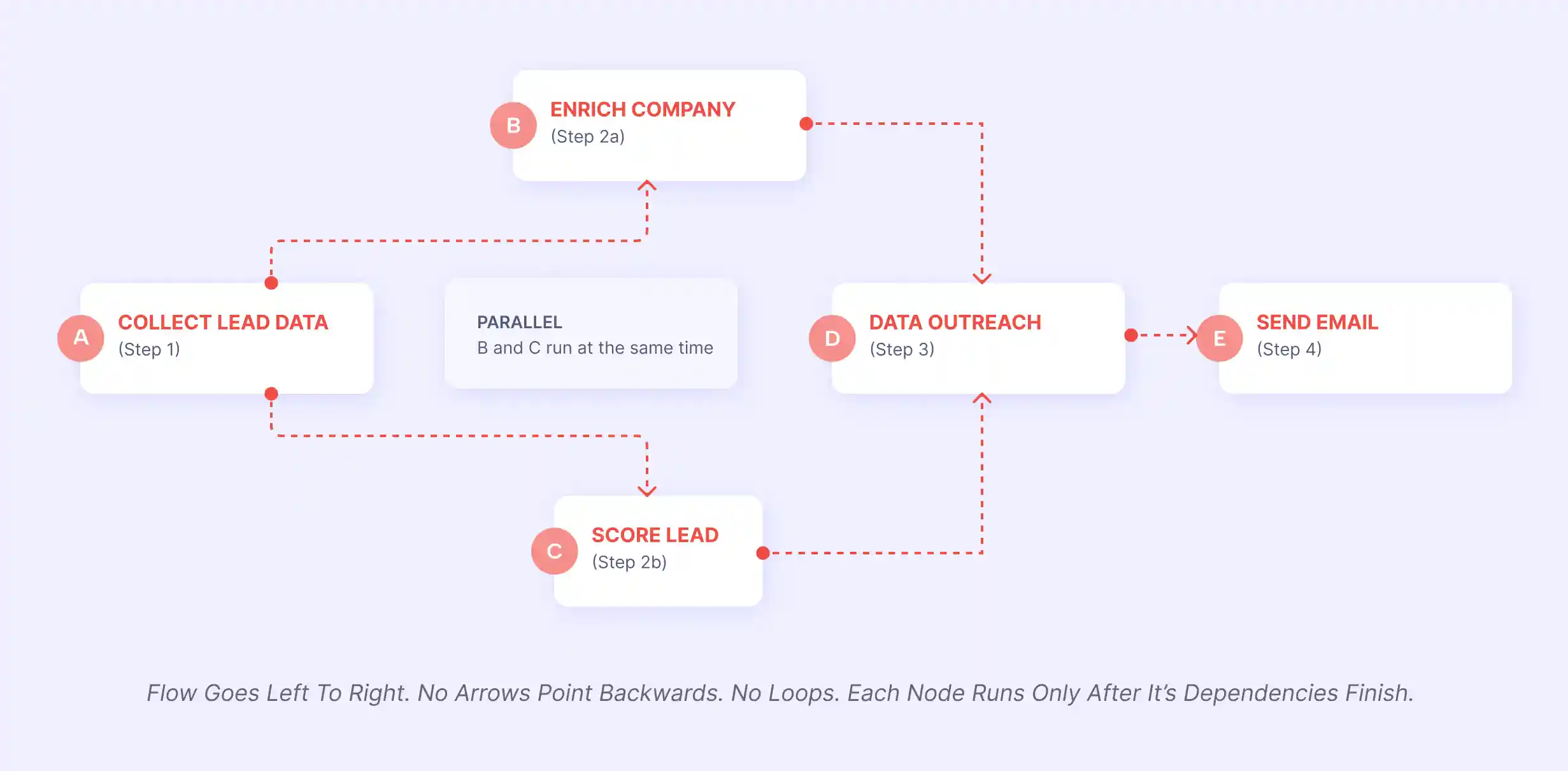
Step-by-Step: What Each Node Does
Node | Step Name | Depends On | Runs When | Produces |
|---|---|---|---|---|
A | Collect Lead Data | Nothing; it's the start | Immediately | Lead name, email, company domain |
B | Enrich Company Info | Node A | As soon as A finishes | Company size, industry, funding stage |
C | Score Lead | Node A | At the same time as B | Lead score (0–100) based on fit |
D | Draft Outreach | Nodes B AND C | Only after both B and C finish | Personalised email draft |
E | Send Email | Node D | As soon as D finishes | Email delivered to prospect's inbox |
What DAGs Enable That Sequential Flows Do Not
A sequential workflow runs steps one after another. Step 1 completes, then Step 2 runs, then Step 3. This is simple and predictable, but it is inefficient when multiple steps could run at the same time.
A DAG captures the actual dependency structure of the workflow. Steps that have no dependency on each other can run in parallel. Steps that depend on the output of other steps wait until those steps are complete. The result is that a complex workflow can run in the most efficient order based on what actually depends on what, not based on the order in which someone put the steps in.
Notice that B and C both depend on A, but they do not depend on each other. That means they can run at the same time (in parallel). This is the real power of a DAG.
Without a DAG (plain sequential):
A → B → C → D → E
Total time = A + B + C + D + E
With a DAG (parallel where possible):
A → (B and C together) → D → E
Total time = A + max(B, C) + D + E
If B takes 3 seconds and C takes 2 seconds, you save 2 seconds on every single run
At scale, across thousands of leads and dozens of agents, those savings compound into a dramatically faster pipeline.
Why "No Loops" Matters
Imagine if D (Draft Outreach) pointed back to B (Enrich Company). The workflow would loop forever: enrich → score → draft → enrich → score → draft → … It would never finish.
The acyclic rule prevents this. Every path through the graph has a definite end. The workflow always terminates.
Why this matters for GTM workflows: A prospecting workflow might need to enrich a contact, check their company’s funding history, look up recent news mentions, and then generate a personalized outreach. Some of those steps can run in parallel. Others depend on previous outputs. A DAG captures exactly those dependencies and runs the workflow in the most efficient order. |
Static Flows vs. Dynamically Generated Execution Graphs
Here is the key distinction between first-generation builders and next-generation agentic orchestration.
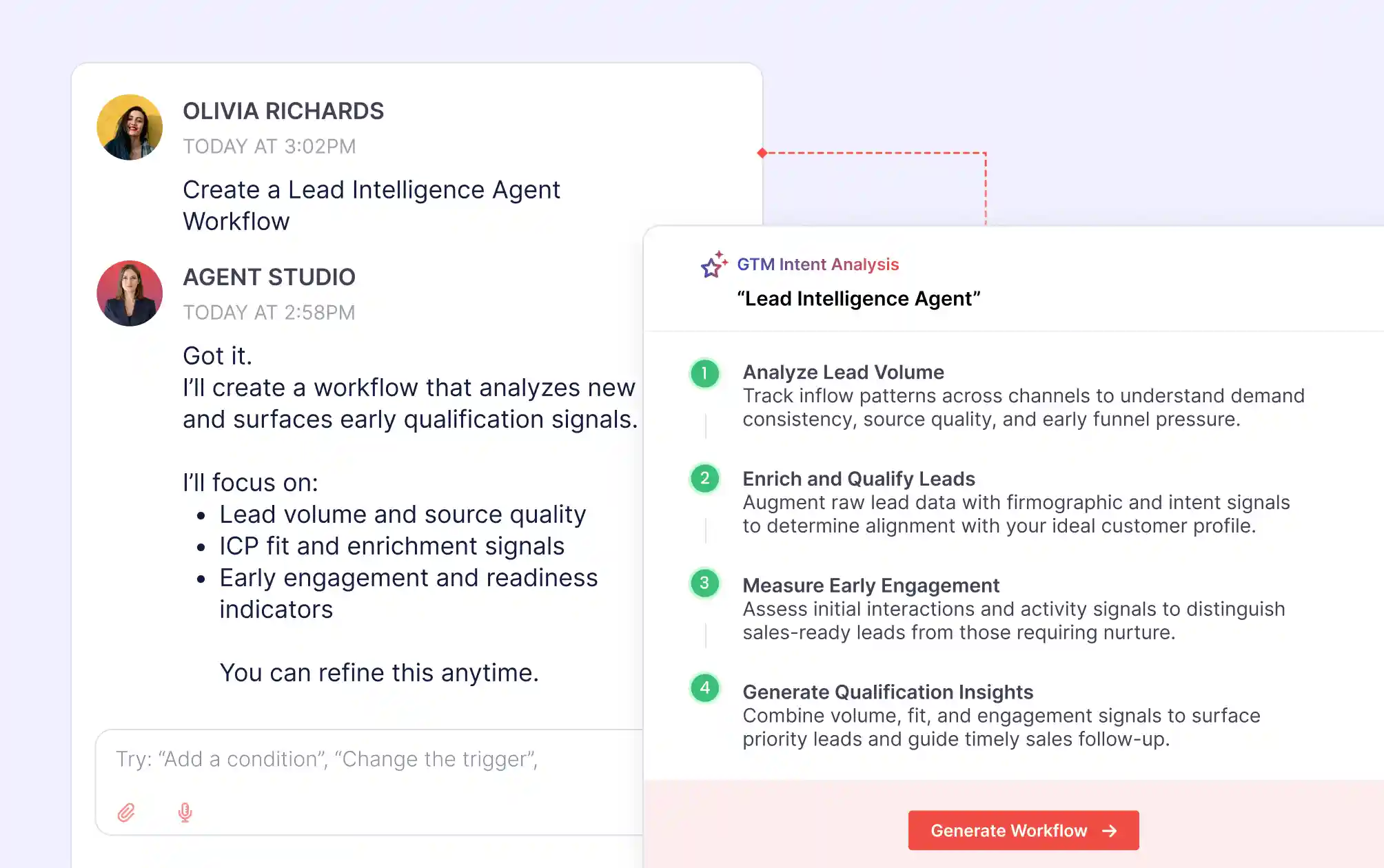
In Agent Studio, you describe what you want in plain language. No drag-and-drop. No code. Just describe the GTM outcome. The AI builds the canvas; the Planner generates the workflow, validates it before running, and self-corrects if inputs are missing mid-execution.
Static Workflow Builder | DAG-Based Agentic Builder (Agent Studio) |
|---|---|
|
|
Aviso Agent Studio Architecture: The Dynamic Planning Loop
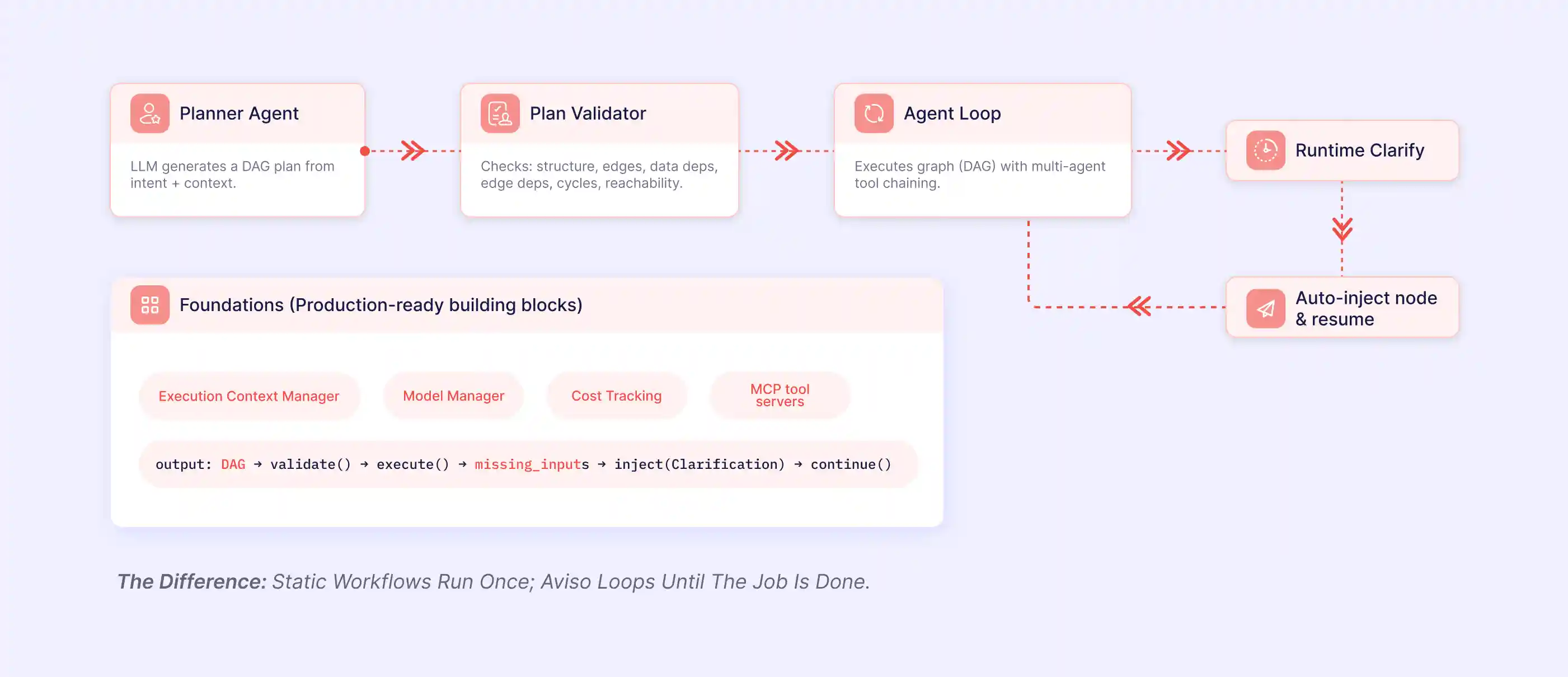
Inside Aviso’s Agent Studio, the journey from a stated goal to completed output follows four stages. Aviso generates an execution graph, validates it before running, and injects clarifications at runtime, so workflows keep moving even when inputs are missing.
Step 1: Plan
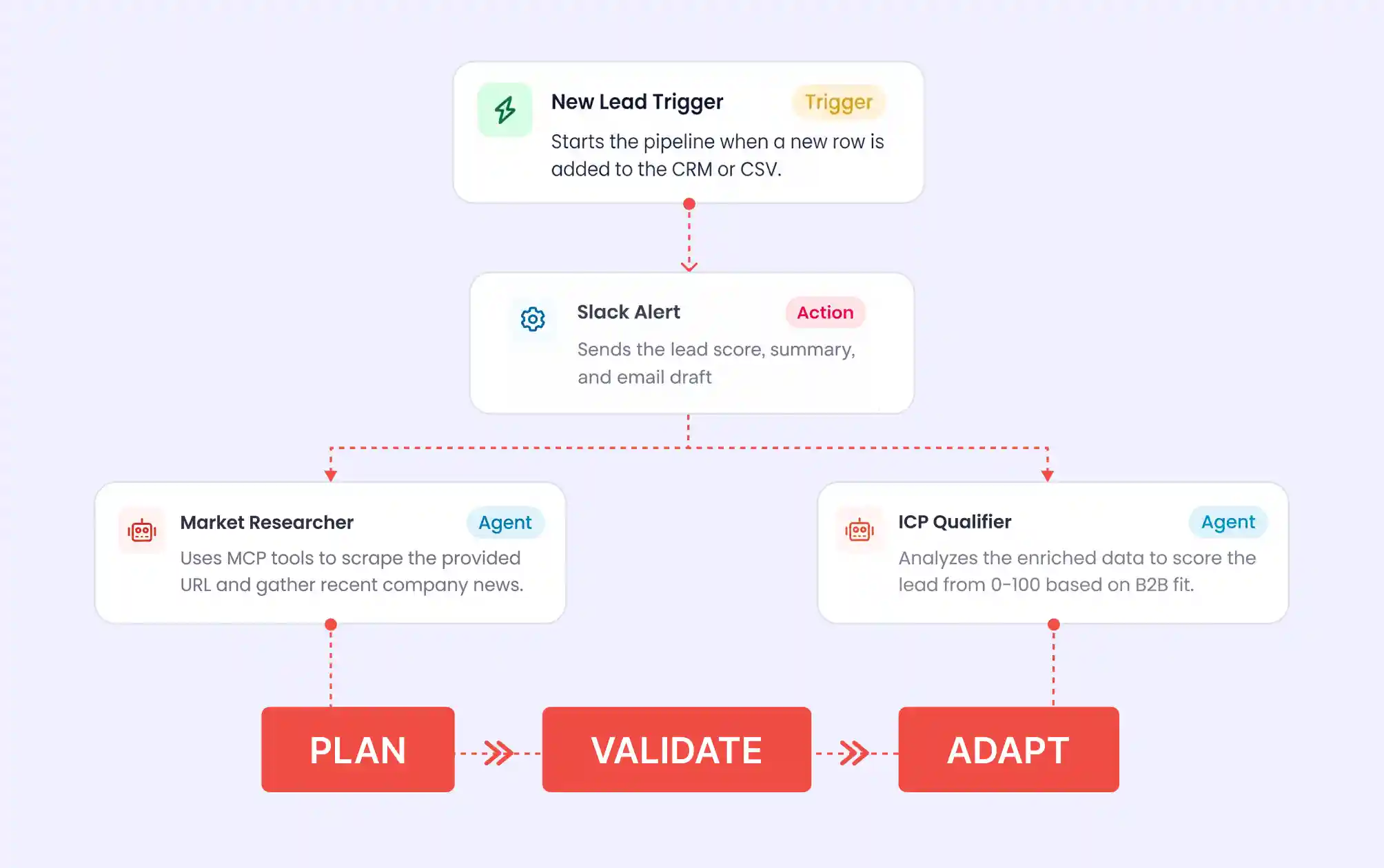
Describe the desired GTM outcome in plain language and modify with AI help. The PlannerAgent takes the intent statement and available context and generates a DAG. It decides which agents to invoke, in what order, with which dependencies between them. The output is not a list of instructions. It is a structured execution graph.
The LLM is doing something specific here: given the goal and the available tools, what is the most logical sequence of steps, and which of those steps can run in parallel? It encodes that reasoning into the graph structure.
Step 2: Validate
Before a single step executes, the PlanValidator checks the generated graph for structural correctness. It is checking whether the plan is executable at all.
The validator checks for four categories of structural problems: cycles (dependency chains that loop back on themselves and can never resolve), unreachable nodes (steps included in the plan that no execution path leads to), broken data dependencies (a step that expects an output from another step that does not produce it), and edge dependency errors (connection logic that is structurally invalid).
If the validator finds any of these issues, it surfaces them before execution begins. The workflow does not run until the plan is structurally sound.
Step 3: Execute
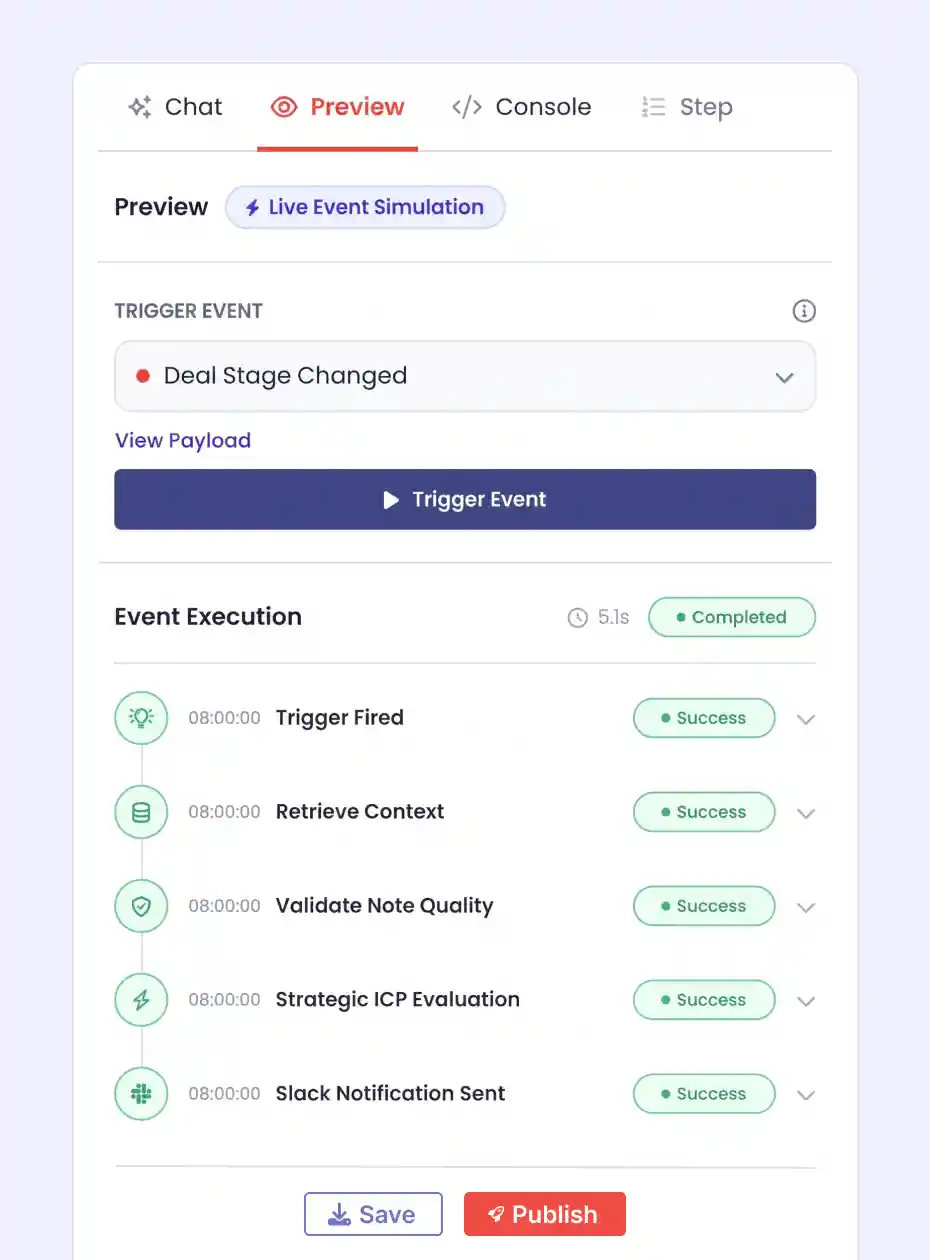
Agents execute across Aviso’s presentation layer: Library, Halo AI, MIKI, and Avatar. The AgentLoop runs the validated DAG. Each node in the graph is an agent with access to its own set of MCP tool servers, its own model configuration, and its own persistent context. Agents execute in the order the graph specifies, passing their outputs to downstream nodes as inputs.
Because the graph has already been validated, the AgentLoop does not need to check for structural errors at runtime. It can focus entirely on execution. Steps that have no dependencies on each other run in parallel. Steps that depend on upstream outputs wait until those outputs are available.
Per-agent model configuration means that different steps in the same workflow can use different underlying models. A simple data transformation step can use a fast, inexpensive model. A complex reasoning step can use a more capable one. Cost tracking at the agent level makes this visible.
Step 4: Adapt
Even with good planning and pre-execution validation, a running workflow can encounter a situation where a required input is not available. In Agent Studio, missing inputs trigger a different response: the system detects the missing input, injects a clarification node into the running graph, surfaces a targeted request for exactly the information it needs, and resumes execution from that point once the input is provided.
The workflow does not restart from the beginning. Completed steps do not re-run. The graph resumes from the exact point where it paused, with the missing input now available.
The key difference: Static workflows run once. If something goes wrong or an input is missing, the workflow stops and waits for a human. Aviso Agent Studio loops until the job is done, handling missing inputs and unexpected states without requiring a manual restart. The PlannerAgent builds the graph. The PlanValidator checks the graph. The AgentLoop runs the graph. Runtime Clarification handles the gaps. Static tools do the third step only. Aviso does all four. |
The Full Agent Studio Environment
Agent Studio is more than the planning loop. It is your complete environment for creating, scaling, and governing GTM agents:
My Workspace (Build): Build and test agents before publishing to teams
Knowledge Base (Ground): Manage organizational knowledge and external data connections needed to train your agent. Agents use your CRM, conversation intelligence, docs, and playbooks for trusted, hallucination-free insights.
Agent Inbox (Observe): Monitor performance of deployed agents
Agent Library (Publish): Deploy 100+ pre-built templates or publish your own to scale winning plays across teams. Agents execute across Library, Halo AI, MIKI, and Avatar interfaces.
Out-of-the-Box Agents for Every Sales Role
Agent Studio ships with ready-to-use agents mapped to real GTM personas and daily workflows:
Role | Available Agents |
|---|---|
CRO / Sales Leaders | Forecast Risk Agent, GTM Play Effectiveness Agent, Coverage & Capacity Agent, Execution Drift Agent |
First-Line Managers | Pipeline Inspection Agent, Coaching Opportunity Agent, Deal Escalation Agent, Rep Activity Gap Agent |
Sales Reps | Daily Deal Review Agent, Pre-Meeting Brief Agent, Follow-Up Recommendation Agent, Risk Signal & Next Best Action Agent |
RevOps | Data Hygiene Agent, Playbook Compliance Agent, Automation Health Agent, Policy Enforcement Agent |
Multi-Agent Specialization
Traditional workflow automation uses a single execution engine. Every step runs through the same logic, with the same model, using the same context window.
Agent Studio distributes work across multiple specialized agents. Each agent in the DAG has its own model configuration, its own set of MCP tool servers, and its own persistent context. The result is that each step is handled by the most appropriate agent for that task.
Model-Agnostic Execution
Different agents in the same workflow can use different underlying LLMs. A step that performs a straightforward data lookup does not need the same model as a step that synthesizes findings from multiple sources and generates a recommendation.
Per-Agent Tool Access via MCP
Each agent has its own set of MCP tool servers — the interface through which agents interact with external systems: CRM records, enrichment APIs, communication platforms, databases. Tool access scoped per agent reduces the risk of unintended side effects and makes the system easier to audit.
Persistent Context and Cost Tracking
Each agent maintains its own context across its execution. Cost tracking at the agent level makes resource consumption visible: you can see which steps in the workflow are consuming the most tokens and optimize accordingly.
The Bottom Line
A DAG-based agentic builder is not a fancier version of the workflow tools you already have. It is a different approach to automation, built on the premise that complex workflows should be able to figure out their own path rather than requiring you to hard-code every possible route in advance.
For GTM teams managing workflows that cross multiple systems, require reasoning across unstructured data, and need to handle inputs that are not always predictable, that shift in premise is what separates automation that works when conditions are perfect from automation that works when conditions are messy.
The core loop is simple to remember: Plan. Validate. Execute. Adapt. What makes it powerful is that each of those stages is handled by the system, not by the person maintaining the workflow.
With Aviso’s agentic AI architecture, revenue teams can move beyond rigid automation and build adaptive workflows that operate with the context, governance, and intelligence required for modern enterprise GTM execution.
👉 Ready to see how adaptive AI workflows can transform your revenue operations? Book a demo with Aviso.
Up next in Part 3: When to choose Aviso Agent Studio over a static builder: the decision framework for GTM and RevOps teams. Four fit criteria, real workflow examples, and a structured approach to running a proof of concept before committing to a migration. |
FAQs
What is a DAG-based AI agent? A DAG-based AI agent uses a Directed Acyclic Graph — a structured map of steps with one-way dependencies and no loops — as the execution plan for its workflow. The graph is generated at runtime by an LLM-powered planner from the stated goal and available context, then validated for structural correctness before execution begins. Steps with no dependencies on each other run in parallel; dependent steps wait for their inputs. The result is a workflow that figures out its own most efficient path rather than following a hand-built sequence.
How does agentic AI work? Agentic AI works in a planning loop: Plan, Validate, Execute, Adapt. A planner agent generates an execution graph from the goal and context. A validator checks the graph for cycles, unreachable nodes, and broken data dependencies. An execution layer runs the validated graph, using parallel execution where possible. When inputs are missing mid-run, the system injects a clarification step and resumes from the exact point it paused — no full restart. Aviso Agent Studio is built around exactly this loop.
What is AI agent architecture? AI agent architecture refers to the structural design of an AI agent system — how the agent receives goals, plans actions, executes steps, manages context, accesses tools, and recovers from errors. Modern agent architectures typically combine an LLM-based planner, a validation layer, an execution engine that runs the validated plan, and per-agent tool access (often via the Model Context Protocol, MCP). DAG-based architectures encode the plan as a directed acyclic graph so it can be reasoned about, validated, and executed in parallel where possible.
What is the difference between a static workflow and an agentic workflow? A static workflow is built manually by a human and runs the same steps every time, regardless of context. Edge cases require manual rewrites, and missing inputs cause silent runtime failures. An agentic workflow is generated by an LLM from the stated intent and available context — it adapts the plan to what each specific run needs, validates the plan before executing, and asks for clarification when inputs are missing instead of failing. Static workflows execute pre-defined paths; agentic workflows generate the path at runtime.
What are multi-agent systems? Multi-agent systems are AI architectures where multiple specialized agents collaborate on a task, each with its own model configuration, tool access, and persistent context. Instead of one execution engine handling every step the same way, work is distributed across agents purpose-built for specific subtasks — a fast, inexpensive model for simple data lookups; a more capable model for complex reasoning. In Aviso Agent Studio, every node in the DAG is a specialized agent with scoped tool access via MCP and per-agent cost tracking.
How does Aviso Agent Studio's architecture differ from other AI agent builders? Most AI agent builders execute pre-built workflows (n8n, Zapier) or run a single execution engine across every step (general-purpose LLM apps). Aviso Agent Studio is DAG-based, multi-agent, and grounded in revenue data. The PlannerAgent generates the execution graph from natural-language intent. The PlanValidator checks the graph for structural correctness before any step runs. The AgentLoop executes the validated DAG with per-agent model configuration and tool access. Runtime Clarification handles missing inputs without restarting the workflow. Few platforms do all four stages; static builders do only the third.
Why does pre-execution validation matter? Pre-execution validation catches structural problems — cycles, unreachable nodes, broken data dependencies, and invalid edge logic — before any step runs. Most workflow tools discover failures at runtime, after partial execution, when the cost of recovery is highest. Validating the plan before execution prevents partially-completed workflows, reduces rework, and surfaces problems at the cheapest moment to fix them.
What is runtime clarification in agentic AI? Runtime clarification is the ability for an agentic workflow to pause when a required input is missing, surface a targeted request for exactly that input, and resume execution from the point it paused — rather than restarting from the beginning. In Aviso Agent Studio, the system detects the missing input, injects a clarification node into the running graph, asks for what it needs, and continues from where it stopped once the input is provided. Completed steps don't re-run; the workflow keeps moving.